If you browse with several profiles, cookies and history are kept apart, but downloads usually are not: every profile saves into the same Downloads folder. That folder mixes the files of every profile, sits in the search index and outlives the profile that made them. On 7 October 2026 we changed Mosaic so each profile saves into its own folder, and we had argued for the opposite only a few weeks earlier.
The argument for one folder
The first version of Mosaic did nothing special, so Chromium did what it does with a fresh data directory. It put the Downloads folder inside the profile's own --user-data-dir, which meant every profile wrote to profile-data/<uuid>/Downloads. Nobody could find those folders. Each one was named by a UUID, buried in Application Support, and different for every profile. Downloading into the home folder had its own cost on macOS: it raised the system prompt asking for access to the Downloads folder.
So we moved everything to one shared folder, ~/Downloads or whatever the operator chose, and wrote the reasoning down. Separation is the point for cookies, history and storage, because a site must not see across them. For a file the operator asked the browser to hand back, separation is the opposite of the point. One folder, like any browser.
That was right about convenience. It said nothing about anything else.
Browser downloads and privacy across multiple profiles
The files a profile saves are the invoice from that shop, the export from that ad account, the screenshot from that research session. Each one is evidence of the profile that saved it. In ~/Downloads they sat together with every other profile's files, in the first place anybody or anything looks. Spotlight indexed them. Whatever backs up or syncs the home folder took copies.
And they outlived the profile by years. Purging a profile in Mosaic destroyed its cookies, its history, its launcher and its fingerprint, and left its documents in ~/Downloads for good. We spend real effort making sure two profiles share no cookie, no exit and no inherited setting. A folder holding both profiles' paperwork undid some of that on the operator's own disk, where no website ever looks but a person might.
The request that started the change was blunt: downloads should go "inside a Mosaic folder, hidden from the normal device … easy to delete, all in the settings".
Your profiles, cookies and proxies stay on your computerIn Mosaic: Local first. Profiles, cookies and proxies stay on your computer. Free holds 3 profiles. Pro is $49 a month for any number.
Mosaic is a desktop app
Email yourself the link and open it on your computer.
Four properties, not one
We kept both modes and made the per-profile one the default. It does four separate things:
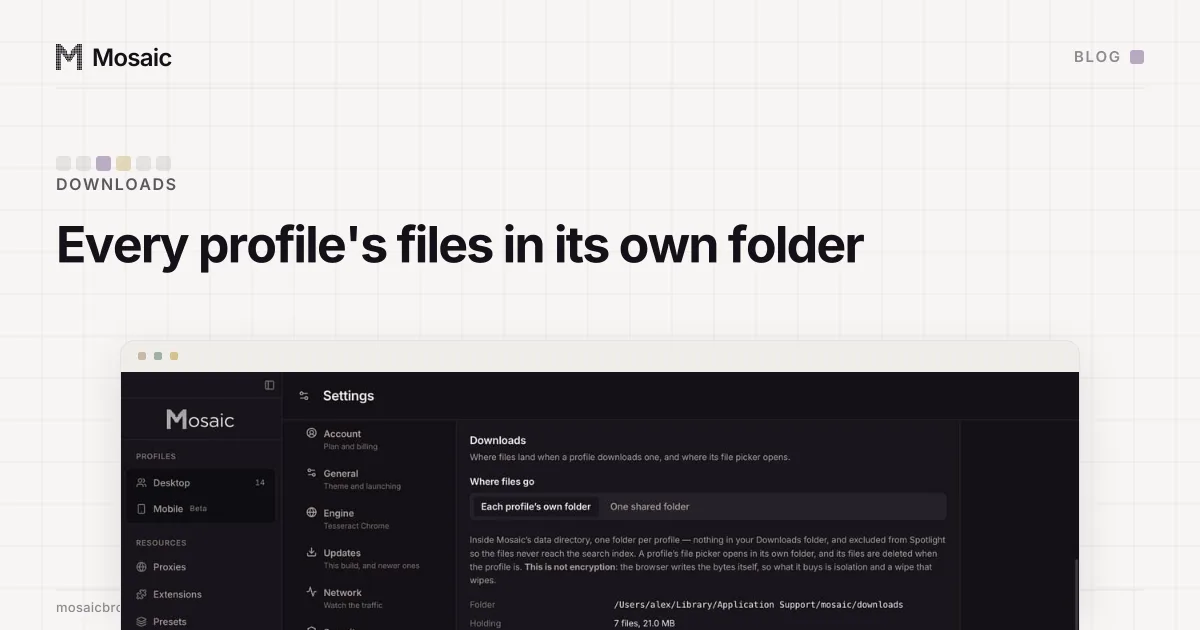
- Out of the home folder. Each profile writes into its own folder inside Mosaic's data directory. Because the app is writing inside its own directory, the macOS prompt for the Downloads folder no longer appears.
- Out of the search index. One
.metadata_never_indexfile at the root of the store keeps Spotlight away from every folder under it, including ones made later. A marker per profile would be one more thing to forget. - Deleted with the profile. When a profile is purged, its downloads go in the same step as its browser data. That happens in
purgeProfile, the one function every destructive path goes through, so a new way to delete a profile cannot forget the files. - Emptied on demand. Settings › Storage › Downloads lists each profile with its file count and size, and empties one profile or all of them. The REST API has
GET /downloadsandPOST /downloads/clear, and MCP haslist_downloadsandclear_downloads.
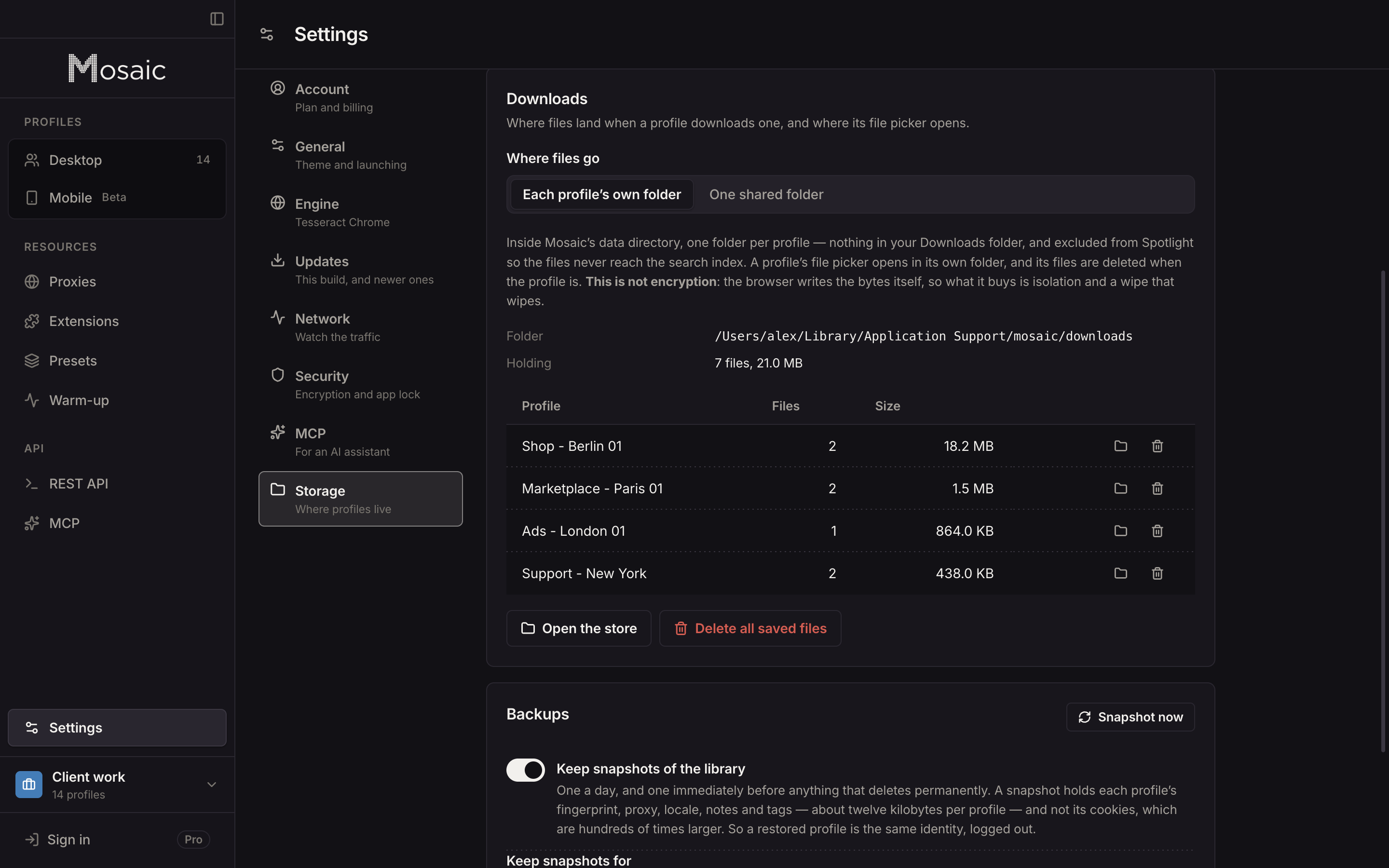
A folder the browser can write to but never reads from is only a hiding place, so the file picker comes along too. Chromium keeps three remembered folders: one for downloads, one for Save page as, and selectfile.last_directory for where a Choose file dialog opens. Mosaic sets all three to the profile's folder, so uploading the invoice you just saved starts in the right place. That is where the picker starts. Chromium moves the preference when you browse somewhere else, and Mosaic writes it again at the next launch, so nothing stops you reaching your Desktop.
Why we did not call it encrypted
The request said "encrypted folder … or something", and we read the honest half of that as "hidden". Chromium writes each download with its own file handle. Nothing in Mosaic sits between the network and the disk, so we cannot encrypt the bytes on the way in. The only real options are a mounted disk image or a filesystem layer, and both fail closed whenever they are not mounted: a download errors, or a file picker opens on nothing. That is a worse product than a folder that is simply out of the way.
So the settings card says it in bold: This is not encryption. Mosaic's store and cookie jars are encrypted on disk; downloads are not, and FileVault is the answer for the whole disk.
A wipe has to be asked for by name
Emptying downloads deletes files from the disk. They do not go to a trash, and nothing restores them. We once lost 586 profiles to a cleanup that read an empty scope as "everything", so POST /downloads/clear with an empty body is a 400. It takes a list of profile ids, or all: true said out loud. all: true is also the only way to remove orphaned folders, whose profiles are gone. In the settings table those rows read "Deleted profile" with the first characters of the id, because nothing else in the app will ever name them.
The same rule runs through trashing a running profile: what a profile leaves behind is part of the profile. The rest of what stays on your computer, and what never leaves it, is on local first. The Widevine certificate is the same lesson from the other side: one value shared by every profile on a machine, which a site could read.