When a Facebook ad account is restricted, the word can mean four different things, from a lower daily spend cap to losing the right to advertise at all. The email and the Facebook notification rarely say which, so the first job is to find out. The answer is in Meta Business Support Home, and the only official way out is a review requested from there.
What "Facebook ad account restricted" can mean
Meta's help page lists four kinds of advertising restriction: a limit on how much you can spend per day or a lower payment threshold, loss of some payment features, loss of some advertising features, and loss of the ability to advertise on Meta at all (About advertising restrictions, read 2 November 2026).
It also lists when Meta applies them:
- the advertiser does not follow the Community Standards, the Advertising Standards, the Commerce Policies or other Meta terms;
- Meta suspects the business portfolio or its assets have been hacked;
- the advertiser does not meet Meta's two-factor authentication requirements;
- Meta wants to be sure an advertiser keeps following its policies, and caps daily spend or billing until it is;
- Meta sees unusual payment or account activity, or high rates of failed or disputed payments.
Three of those five have nothing to do with the ads. A card that keeps failing, a login from a device Meta does not know, or an admin who never set up two-factor authentication can each restrict an account whose campaigns are fine.
Which account is restricted
A restriction lands on one of four things, and each behaves differently. A restricted business portfolio cannot advertise. A restricted ad account has its ads and some of its assets disabled. A restricted Page cannot advertise. A restricted personal profile cannot create ads, and Meta says that "any ad accounts where they're the only attached user may also be disabled", while other people on the same portfolio, ad account or Page may still be able to advertise.
That last case is why every ad account should have at least two people on it. A client account whose only admin is one freelancer goes down with that freelancer's profile.
Each profile keeps its own passwords and its own 2FA codesIn Mosaic: Logins and 2FA codes. A password vault and TOTP codes for each profile. Free holds 3 profiles. Pro is $49 a month for any number.
Mosaic is a desktop app
Email yourself the link and open it on your computer.
How it works: Logins and 2FA codes
How to see the reason
- On a computer, open Meta Business Support Home.
- Pick the date range at the top right: the last 14, 30 or 90 days.
- Under Recent account issues in Account status overview, open the Outstanding tab.
- Click the restricted account and read the What you can do section.
Meta may ask you to confirm your identity, complete verification, secure the account, or request a review (Troubleshoot a disabled or restricted account, read 2 November 2026). Do what it asks in that order. A restriction for a suspected hack, for example, will not lift on a review while the account is still unsecured.
The same screen is where you check a message that claims to come from Meta. Business Support Home says to confirm there any email, text or call that says your account has issues (About Business Support Home, read 2 November 2026).
How to request a review
You must be an admin on the account. Then, in Business Support Home:
- Select Account status overview in the left menu.
- Select the restricted account.
- In What you can do, select Request review.
- Complete the steps on screen.
Meta's page says the review is typically completed in 48 hours, sometimes longer (Request a review, read 2 November 2026). If Meta agrees with you, the account is reinstated, but ads that were running before are not restarted; you turn them on again in Ads Manager. If it does not, the restriction stays and the account is blocked. There is a limited number of reviews, and once one is completed "the decision is final".
Read the policy you were flagged under before you write anything. A review that explains what you changed on the landing page, or shows the card dispute was settled, gives the reviewer something to check.
The 6-month line
For an ad account disabled for a policy violation, time matters. Meta's page says that if the account "remains ineligible for reinstatement for 6 months", unused prepaid funds may be forfeited where the law allows, and after that the account cannot be reinstated. Request the review early, while there is still something to restore.
What not to do
Do not open a fresh ad account or a new Facebook profile to keep the campaigns running. Facebook's terms say that if Meta disables your account for a violation, "you agree not to create another account without our permission" (Facebook Terms, 3.1, read 2 November 2026). Google treats the same move as circumventing systems, and our guide to the Google Ads suspension for circumventing systems quotes how it ends. Get the old account reviewed first; a new one does not make the old decision go away.
Keeping a client's account out of this
We cannot lift a restriction, and nothing in a browser changes Meta's decision. What a browser can help with is the security half of Meta's list: a hacked portfolio and missing two-factor authentication are both reasons Meta gives for a restriction.
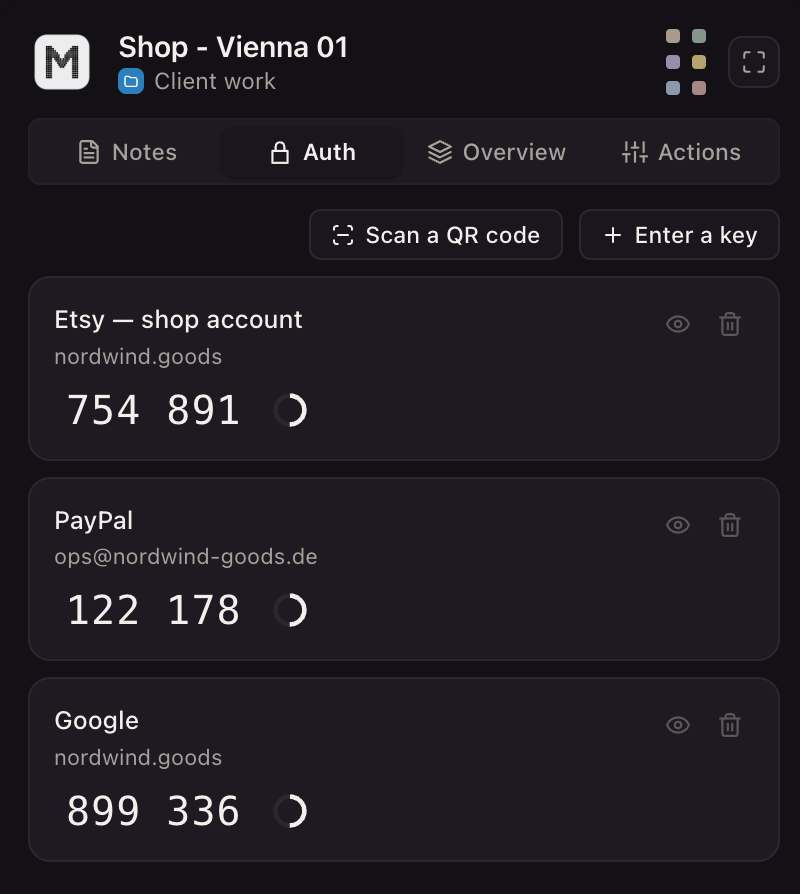
Meta may require two-factor authentication before an advertiser can publish ads, and says that without it, it may restrict or remove access to advertising or remove a payment method (two-factor authentication, read 2 November 2026). In Mosaic, each client login lives in its own profile with its own cookies, and the Credentials screen stores that profile's two-factor secret. The companion inside that profile's browser shows the current code, for that client only.
How ad accounts are meant to be arranged in the first place, one portfolio and one Facebook profile, is in how to manage multiple Facebook ad accounts. How an agency keeps each client's logins apart day to day is in Mosaic for agencies, and the ad-side set-up, with each client's logins and codes in a profile of their own, is in Mosaic for ad account management.
Sources
- Meta Business Help Center: About advertising restrictions, read November 2, 2026
- Meta Business Help Center: Request a review for a restricted advertising account, read November 2, 2026
- Meta Business Help Center: Troubleshoot a disabled or restricted account, read November 2, 2026
- Meta Business Help Center: About Meta Business Support Home, read November 2, 2026
- Meta Business Help Center: About two-factor authentication for your business portfolio, read November 2, 2026
- Facebook Terms of Service, 3.1 Who can use Facebook, read November 2, 2026