When Pixelscan says your fingerprint is inconsistent, it has found two values in your browser that cannot both be true of one real computer on that network. The verdict is not about rarity, and Pixelscan does not tell you which value it was. In our runs the usual culprits were an operating system the installed fonts contradict, a graphics chip the driver contradicts, canvas noise that reads as a filter, and a timezone far from the IP. Some of the time it was nobody's fault but Pixelscan's.
Pixelscan is the detector we have spent the most hours on while building Tesseract Chrome, our own Chromium, so every cause below comes with the date we measured it and what moved the verdict. For what each card on the page compares, see the card-by-card readout.
First, rule out Pixelscan itself
In September 2026 three fresh profiles on our engine came back inconsistent one after another, and we treated it as a regression. We had already spent four rounds bisecting the configuration when someone opened an untouched Google Chrome 152 on the same Mac and got inconsistent twice. One stock run answered what the bisect had not.
We then ran that stock Chrome 20 times, a fresh profile each time, no proxy. Pixelscan called it consistent 16 times, masked 3 times, and gave no verdict once. Google's own browser, on our machine, was "masked" about one run in six.
So before you change anything:
- Run the scan three times.
- Run an untouched Chrome of the same version beside it, from the same address.
- If both come back red, the finding is about the site or the address and not about your browser.
If you read Pixelscan with a script, watch for negations. Its clean label is "No masking detected", and a search for "masking detected" matches it. Our extractor did exactly that and logged ten clean profiles as failures. What gave it away was that it failed under every configuration, including one with no fingerprint switches at all, and a check that fails whatever you change is reading something other than what you changed.
When the fonts belong to another operating system
The fonts on a computer are whatever is installed there, rendered the way its operating system renders them, and no browser setting reaches either. On our Mac in September 2026, a profile claiming Linux listed one font on Pixelscan (Abyssinica SIL) against 159 for the same Mac claiming macOS, and Pixelscan called it masking. Profiles claiming Windows left the scan running and never got a verdict. IPHey, on the same engine, gave the macOS claim 100/100 and the Windows claim 80/100.
This is why Mosaic, which lets a profile claim any desktop OS or Android, shows a caution in the editor when a profile claims a desktop other than the computer's own: the hardware is drawn coherently for the claimed OS, but the fonts still come from this machine, and the computer's own OS is always the strongest match.
The fingerprint is changed inside the engine, not painted on topIn Mosaic: Its own Chromium. Tesseract Chrome: values changed in C++, not JavaScript. Free holds 3 profiles. Pro is $49 a month for any number.
Mosaic is a desktop app
Email yourself the link and open it on your computer.
How it works: Its own Chromium
A renderer string the driver contradicts
WebGL tells a page two things about the graphics chip: the renderer string, which names it, and a capability record of limits and extensions, which the real driver writes. Change only the string and they disagree. We tried it on stock Chrome on an M4 Max, claiming an Apple M2 Pro, and Pixelscan failed it on every run while IPHey and BrowserScan did not move.
Our engine changes the string and the record together, in C++. Through the same sweep it passed every Apple chip we claimed, including an M9 Ultra that has never existed.
Canvas noise that looks like a filter
Each profile gets its own canvas hash from a small amount of noise, and the way that noise is applied turned out to matter more than its presence. We got it wrong twice.
| Version | What we measured | Pixelscan |
|---|---|---|
| Noise keyed on pixel position | The same text drawn at two heights came out 76 bytes apart (a real browser: 0) | consistent, inconsistent, consistent, inconsistent on four fresh profiles |
| Keyed on colour, every opaque pixel touched | Identical content stayed identical | failed 5 times out of 5 |
| Keyed on colour, about one colour in 32 | Identical content stayed identical | 8 passes from 8 fresh profiles, 8 distinct canvas hashes |
The first row was settled by one profile we bisected field by field: two passes with canvas noise off, six failures with it on. The second row was worse than the first because a change to every pixel is not what two graphics chips rounding differently look like. It is what an image filter looks like. (Canvas fingerprinting explains what the page draws and hashes.)
One profile that fails while new ones pass
We had a profile that failed every run while fresh ones passed. A new user-data folder made no difference. Copying its whole fingerprint onto a new seed fixed it, and putting the old seed back on a passing profile broke that one, alternating cleanly over six rounds. Of its noise settings only canvas mattered: with canvas noise off it passed.
The noise itself was fine by every check we have for canvas consistency. It touched 0.30% of opaque pixels, where six other seeds touched between 0.07% and 0.30%. After that we drew 14 fresh seeds and all 14 passed. If one profile keeps failing and new ones do not, redraw that profile and leave the browser alone.
A timezone from somewhere else
Pixelscan's proxy card compares where your exit is with the browser's timezone and language. A profile set to Europe/Berlin and German that browses from a Texas address will read inconsistent whatever its hardware says. On a VPN this is the cause we would check first, because a VPN moves the address and leaves the clock where it was (how to match the two).
A checklist for a Pixelscan inconsistent fingerprint
| Check | If it moves the verdict |
|---|---|
| Re-run three times, with an untouched Chrome beside it | Both red: the site or the address |
| Read the proxy card | Timezone or language far from the exit |
| Compare the font count with a clean browser on the same machine | An operating system other than the computer's own |
| Turn off canvas noise on that one profile | The noise, or that seed |
| Make a fresh profile on the same proxy | If it passes, redraw the old one |
Where Mosaic stands
On 19 September 2026 we ran the whole detector catalogue with a stock control, and Pixelscan read our profile as consistent, with no masking and no automated behaviour; the untouched Chrome beside it read the same. Across 74 freshly drawn profiles that month, 73 read clean, and the one that showed masking passed the next nine runs. That was one Mac with no proxy, on those dates, and it is not a promise about your machine or your exit.
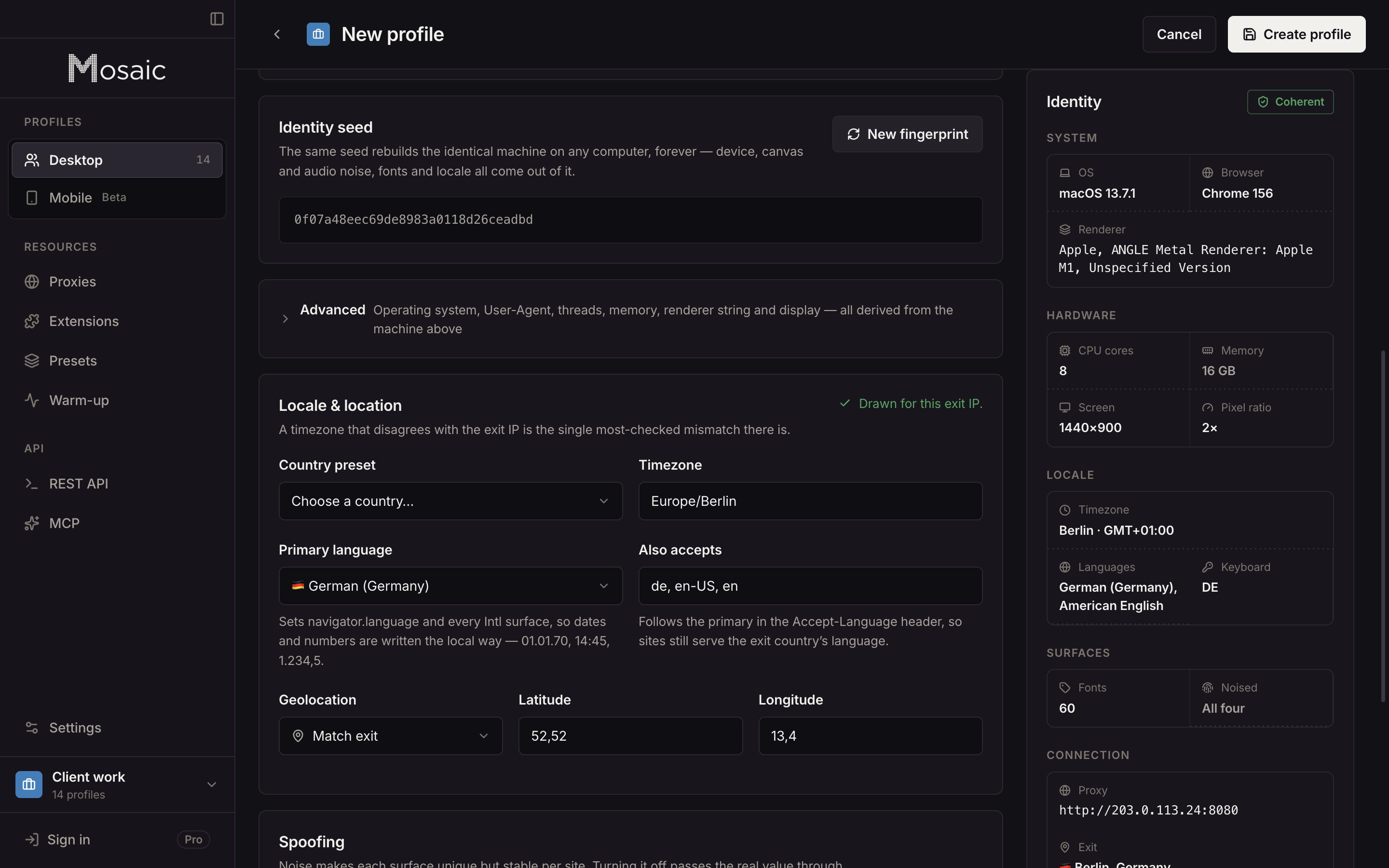
To run it on a profile, open the row's menu, choose Check detectors, stay on Consistency and pick Pixelscan. The scan opens in that profile's own browser, through its own proxy. Every value Pixelscan compares is set inside Tesseract Chrome, in C++, so the page, its workers and its iframes describe the same machine.
Sources
- Pixelscan: fingerprint check, read November 2, 2026