A proxy that connects is not the same as a proxy you can trust an account to. The check has four layers: does it work, where does it really exit, is that address any good, and does the browser stay behind it. Most people only do the first.
1. Does it answer, and does it tunnel?
The first check is whether the proxy accepts your credentials and carries a connection. That has two parts, and the second one is easy to miss. An HTTP proxy can answer a plain request and still refuse a CONNECT tunnel, which is how every HTTPS page is loaded. A proxy that answers but does not tunnel will show you an error on nearly every site.
By hand, from a terminal:
curl -x http://USER:PASS@HOST:PORT https://api.ipify.org
If that prints an IP address, the proxy authenticated you and tunneled an HTTPS request. For SOCKS5, use socks5h:// instead of http:// so DNS is resolved through the proxy too.
Mosaic does this for you on every launch. It supports HTTP, HTTPS and SOCKS5 with authentication, and it will not open a profile behind a proxy that has not answered and tunneled. The refusal says what went wrong, instead of a generic error. That rule exists because the alternative, a browser that quietly falls back to your own connection, logs an account in from your home IP.
2. Where does it really exit?
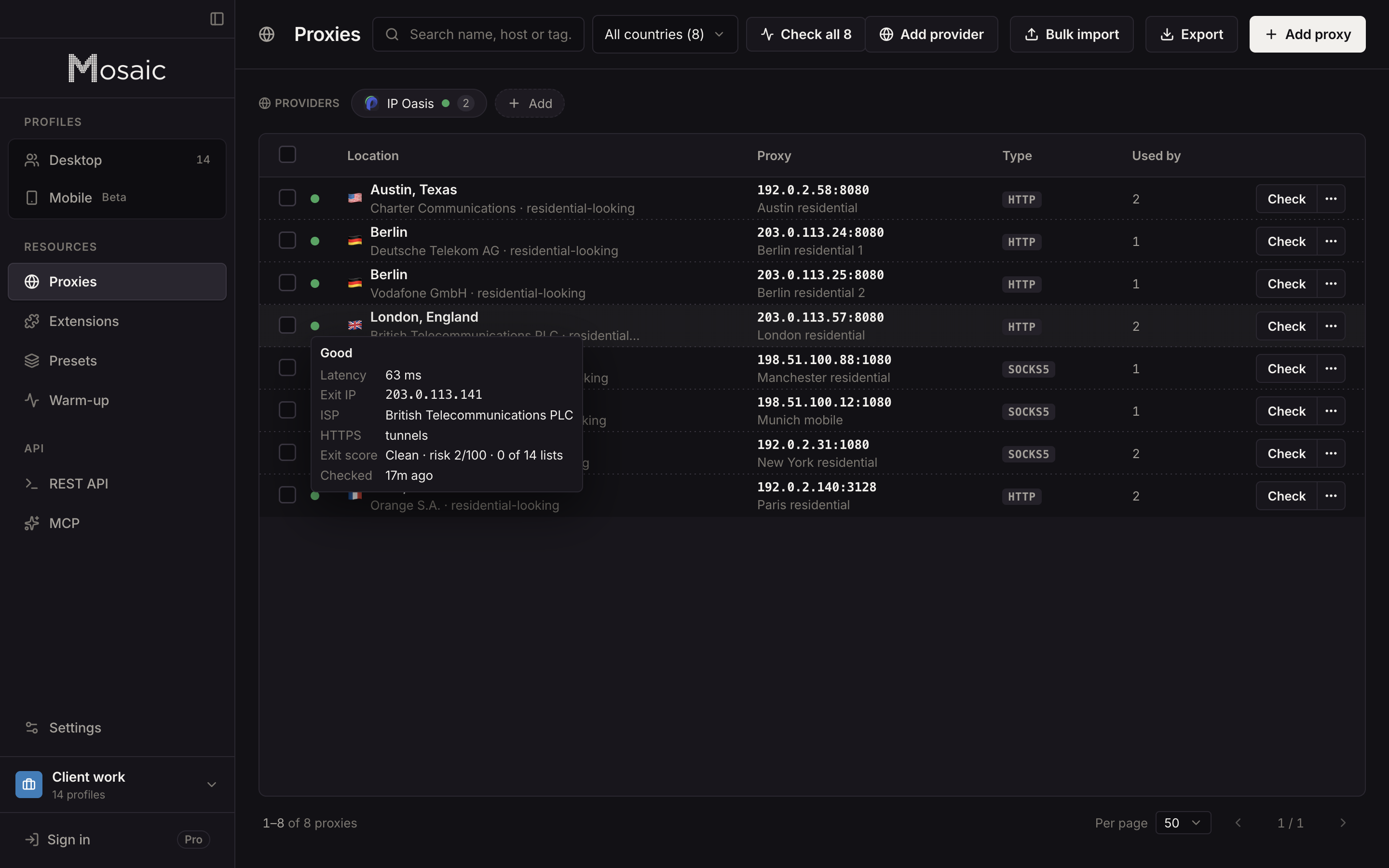
The address you connect to is the gateway. The address websites see is the exit, and they can be in different countries. Read the exit from the outside: the IP a lookup service sees, and the location that IP resolves to.
Then compare it with what you paid for. Proxy sellers route through pools, and "Germany" in a plan name is a request. If the exit is in the wrong country, do not use it for an account that is supposed to live in Germany. Mosaic records the exit's address and location on every check and sets the profile's timezone and language from that measured location, not from the label.
Paste one gateway line. Every profile mints its own exitIn Mosaic: Provider minting. One gateway line, a separate exit for every profile. Free holds 3 profiles. Pro is $49 a month for any number.
Mosaic is a desktop app
Email yourself the link and open it on your computer.
How it works: Provider minting
3. Is the address any good?
An exit address with a bad history gets an account flagged before anyone looks at the fingerprint. It is the first and cheapest check a platform makes. Three things are worth knowing.
Is it on a blocklist? Public DNS blocklists record addresses reported for spam, open proxies and abuse. They are queried with a DNS lookup of the reversed address, and a listing is a concrete fact you can check. Mosaic queries SpamCop, Barracuda, SORBS and s5h, chosen because they answer queries from an ordinary computer. A list that refuses those queries would return an answer that looks like a result and is not one, and a check that lies is worse than a missing one.
Is it residential or a data center? The network classification from a geo lookup tells you whether the address belongs to a home ISP or a hosting company. For consumer platforms, a data center exit stands out; see residential proxy for why.
What does reverse DNS say? Many hosting providers name themselves in the PTR record of their addresses. An exit whose reverse DNS reads like a server farm is a server farm.
Mosaic puts these together as an exit reputation score on the proxy row, so you can score an address before an account goes near it.
4. Rotating proxies need one more step
A rotating endpoint hands out a different exit per connection or per few minutes. Any reputation score you take is then a score of one random address from the pool, not of the address your profile will use. Pin a sticky session first, then check the session. Mosaic says this on the check itself when it sees a rotating endpoint, rather than giving you a score that means nothing.
Sessions also die. Measured on one residential pool, a session that reaches nothing stays dead for every attempt on that same token, while fresh sessions on the same gateway answered normally. So when a session fails, the fix is a new session, not a retry. Mosaic's provider accounts mint a new session when one dies and write it back, and leave alone any session you pinned yourself.
5. Does the browser stay behind it?
The last check happens inside the browser, because a proxy only covers what the browser sends through it. WebRTC can reveal addresses outside the proxy path. DNS can be resolved locally and reveal your ISP. And timezone, language and geolocation can all report your real location even when the IP is perfect.
Mosaic's leak test runs from inside the profile's own page and reports WebRTC, DNS, timezone, language and geolocation for that profile behind its proxy. Run it once for every new proxy and every new profile.
A short checklist
- The proxy answers and tunnels HTTPS.
- The exit is in the country and city you need.
- The exit is not on a blocklist.
- The exit is residential if the account is on a consumer platform.
- For rotating proxies, a sticky session is pinned and checked.
- The leak test shows no WebRTC, DNS, timezone or language leak.
When every line passes, the proxy is ready for an account. Managing multiple accounts without getting them linked covers what comes next: one exit per profile, and the fingerprint matched to it.