Business portfolio vs Business Manager has a short answer: a business portfolio is what Meta now calls Business Manager. It is the same container: the Pages, ad accounts, pixels, catalogues, people and partners that were in your Business Manager are in your business portfolio, and old Business Manager links lead to it. The rename itself moved nothing. What it did was make two older facts easier to miss, and those two are what an agency should re-read: who owns each asset, and which door each person came in by.
Business portfolio vs Business Manager: the words that moved
The product did not change shape, but the vocabulary around it did, and older tutorials still use the old words.
| What tutorials say | What Meta's interface says |
|---|---|
| Business Manager | business portfolio |
| Business Settings | Settings, inside Meta Business Suite |
| Admin access | full control |
| Employee access | partial access |
Meta Business Suite is the screen you work in, and the business portfolio is the thing it manages. That is most of the confusion in one sentence. People search for Business Manager, land in Business Suite, and cannot find "Business Settings" because it is now the Settings menu of the suite. Some of Meta's own buttons and help pages still say Business Manager, so you will see both names side by side for a while.
Each profile keeps its own passwords and its own 2FA codesIn Mosaic: Logins and 2FA codes. A password vault and TOTP codes for each profile. Free holds 3 profiles. Pro is $49 a month for any number.
Mosaic is a desktop app
Email yourself the link and open it on your computer.
How it works: Logins and 2FA codes
Ownership is the part to re-read
A portfolio owns assets. An asset, whether a Page, an Instagram account or an ad account, belongs to exactly one portfolio, and other portfolios can be given access to it as partners. Access is not ownership, and the rename does nothing to make the difference visible: an asset your agency only has access to sits in the same lists as one your agency owns.
Agencies get caught by it at the end of a contract. If you created a client's ad account inside your agency's portfolio, it belongs to your portfolio, along with its spend history. Meta does not let an ad account move from one portfolio to another later. The client leaves, and either the history stays with you or the client starts again with a new ad account. The arrangement that avoids that conversation is the boring one: the client's portfolio owns the client's assets, and your portfolio is added as a partner with the access the job needs.
So the first thing to check in each client's setup is the owner column, not the access column. For every Page and ad account you run, ask which portfolio owns it, and whether that is the one you would want to own it the day the contract ends.
People and partners are two doors
There are two ways into a portfolio, and the old name blurred them.
- People are individuals in your own organisation. Each one is invited by email and signs in with their own Facebook account. They see the portfolio once they accept, and only the assets someone assigns to them.
- Partners are other businesses, such as an agency or a client, each with a portfolio of its own. A partner is added by its business portfolio ID, not by anybody's email address, and then decides for itself which of its people work on what was shared.
An agency working for a client is a partner. Its account managers are people in the agency's portfolio, not in the client's. When a client adds your staff one by one as people instead, the client ends up managing your team's access, and removing someone who leaves your agency becomes a job for the client. When you are added as a partner, it stays your job.
A partner can only pass on what it was given. If a client shares an ad account with your portfolio for running ads, you can give your staff that much or less, never more. If someone on your side cannot see a client asset, the usual cause is that the asset reached your portfolio but was never assigned to that person.
What the rename does not change
A business portfolio does not give anybody a second Facebook login, and it was never meant to. Each person signs in with their own profile, and Facebook's terms ask for one personal account per person. The portfolio is how one profile reaches many businesses' assets without anybody sharing a password.
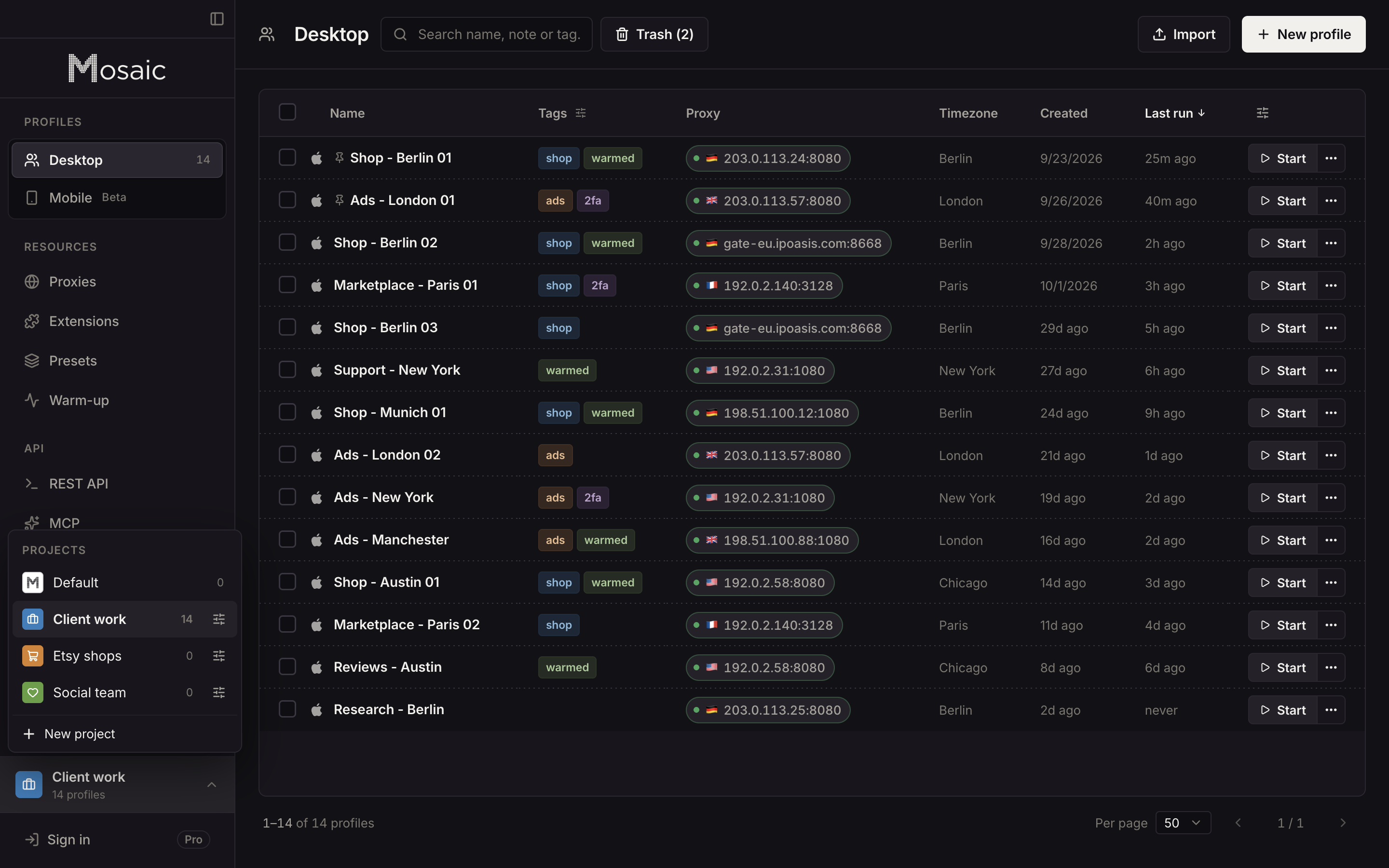
The portfolio also stops at Meta's edge. A client's ads live in a portfolio, but their Shopify admin, their analytics, their email tool and the drive with this month's creatives do not, and none of those have a partner system. That is the part of an agency's day Mosaic was built for. Each client's other logins get their own profile, with its own cookies, fingerprint and proxy, grouped in a project for that client, with the login's two-factor codes kept beside it. Your own Facebook sign-in stays in one profile of its own, because it is one person's.
Mosaic keeps accounts you are entitled to run apart; it does not change what a platform allows. How a profile is put together is in Introducing Mosaic, the category is explained in what an anti-detect browser is, and the plans, including what Free covers, are on the pricing page.