We make Mosaic, which works with proxies and sells none. We tried to be fair; corrections to hello@mosaicbrowser.com.
A residential proxy seller sells you sessions, and a session is short. Oxylabs' default is 10 minutes. An account, on the other hand, lives for months and signs in from the same place every day. Choosing the best residential proxies for multiple accounts is mostly about closing that gap: how long a seller lets a session hold, how close the next one lands, and whether you find out when an exit dies.
Each platform's terms decide how many accounts you may run, and several allow one per person. Mosaic keeps accounts you are entitled to run apart; it does not change what a platform allows. How to manage multiple accounts without getting linked covers the rules side.
One session per account, not one proxy
A residential gateway is one host and port for everybody. What makes your exit yours is the session id written into the credentials: same id, same exit; new id, new exit. So "one proxy per account" really means one session id per account on the same gateway, and the classic mistake is pasting one gateway line into forty profiles without changing it. That is forty accounts on one address.
The residential proxy entry explains where these addresses come from. For several accounts, the four things below are what to compare.
1. How long a session holds
From each seller's own documentation, read on 2 November 2026:
- Oxylabs keeps a session for 10 minutes, or until 60 seconds pass without a request;
-sesstime-<minutes>extends it, and its examples run up to 1,440 minutes. - Bright Data keeps a session's IP for up to 5 minutes of idle time, according to its residential FAQ, so a profile left open with nothing loading can lose it.
- IPRoyal takes
_lifetime-in the password, with values like10mor24h. - Geonode takes
-lifetime-<minutes>in the username; the lines we hold use 120.
Longer is better for accounts, with one caution from Oxylabs' own page: residential availability is dynamic, so an exit can disconnect before the time you asked for. Nobody can promise a home connection stays online.
Paste one gateway line. Every profile mints its own exitIn Mosaic: Provider minting. One gateway line, a separate exit for every profile. Free holds 3 profiles. Pro is $49 a month for any number.
Mosaic is a desktop app
Email yourself the link and open it on your computer.
How it works: Provider minting
2. What happens when the exit dies
This is the question most proxy roundups skip, and the one that matters most for an account. When the home device behind your exit goes offline, a seller either hands you a new address silently or returns an error.
Bright Data returns 502 - No peers available on the first request and then assigns a new peer on the second, even with the same session id; adding -const keeps the session on its peer and returns the error instead. Oxylabs has sessid_oneip, which binds the session to one exit node and returns 502 if it becomes unavailable. IPRoyal replaces the IP by default and documents a killswitch option.
For accounts, the error is the better outcome. A silent change means your account signs in from a new address and you never knew.
We measured the dead-exit case ourselves. Drawing forty fresh sessions from IP Oasis, one came back 504 on the twenty-ninth and stayed dead: four attempts on that session, four 504s, while most of the fresh sessions drawn after it answered 200. Retrying a dead session does not revive it.
3. How precisely you can target
When a session ends, the next one should land near the last one. Country-level targeting can move an account from Munich to Hamburg between Monday and Tuesday; city-level keeps it in Munich. Check that the seller has a word for city, and for state where it matters, before you buy for that reason.
4. Sticky residential or static ISP
For accounts that should keep exactly one address for weeks, a rotating residential pool is the wrong product however long its sessions run. An ISP proxy, sometimes sold as static residential, is an address from a home provider hosted on a server, so it does not go offline when somebody's router does. It costs more per address and comes in fewer cities. A common split is ISP for the few accounts that matter most and sticky residential for the rest.
How Mosaic handles residential sessions
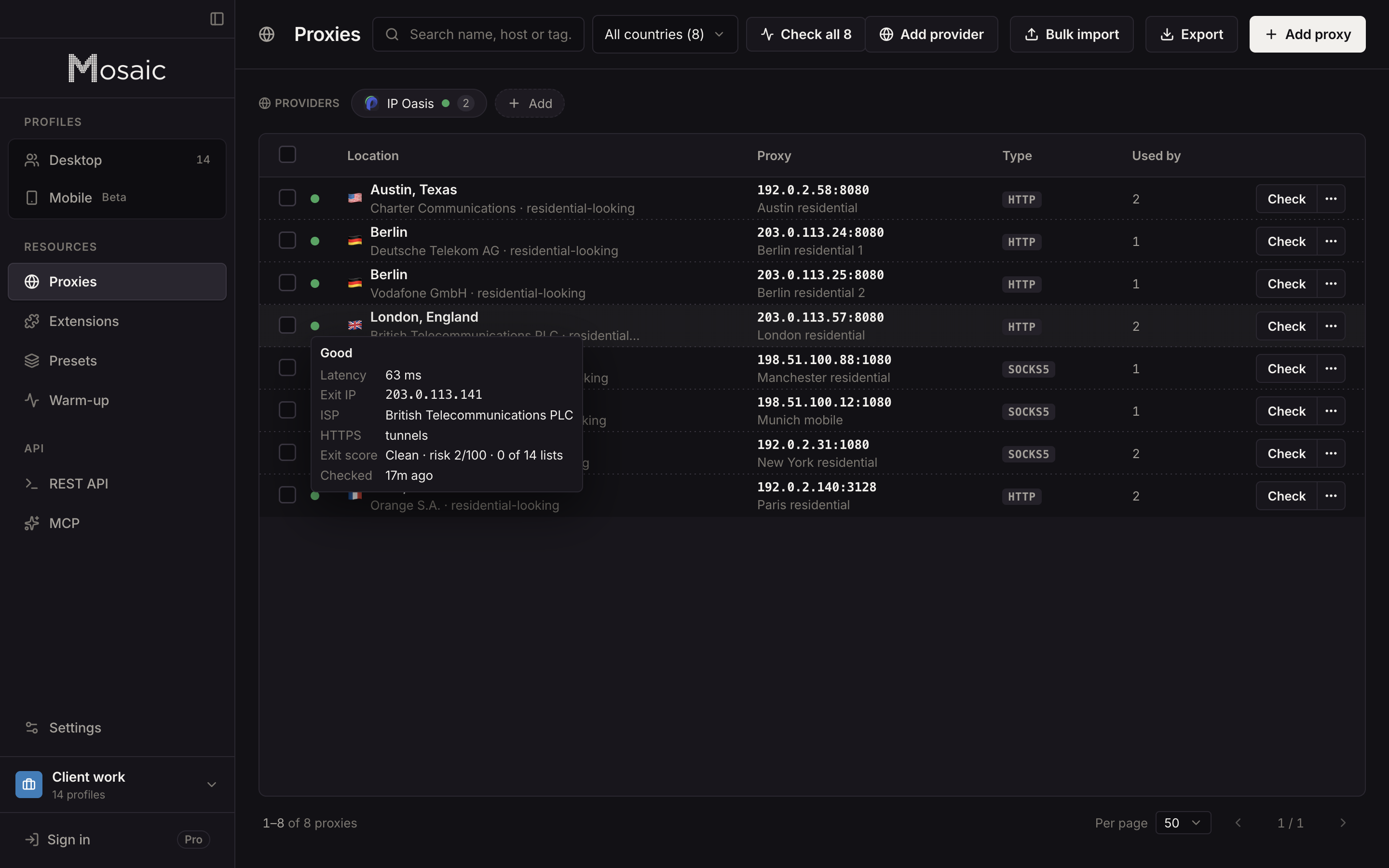
Paste one gateway line from your seller as a provider, and Mosaic mints a separate session for each profile, so no two profiles share an exit by accident. Country, state, city and session minutes are offered per profile only where the seller's line format has a word for them, and a pick the seller cannot spell is refused by name rather than dropped.
Before a profile opens, its proxy is checked: it must answer and tunnel, or the launch stops and says why. The check reads the exit address, the ISP and a reputation score, so you can see a flagged address before you trust an account to it. When a session Mosaic minted turns out dead, it mints a different one, checks it and writes it back to the profile. A session you pinned by hand, for an account that has always used one address, is never moved; the launch is refused with the reason instead.
Six sellers in Mosaic's table are tested against live lines: Cat Proxies, IP Oasis, Thordata, Proxiware, Geonode and DataImpulse. Bright Data, Oxylabs, IPRoyal and the other documented sellers are read from their own documentation, not yet run against a live account. The choice between proxy kinds is in the best proxies for anti-detect browsers.
The best residential proxies for multiple accounts, by job
- Many accounts, each signing in daily: sticky residential with city targeting and the longest session the seller documents.
- A few accounts that must never change address: ISP proxies, pinned per profile.
- Any seller you use: prefer the mode that returns an error over a silent new exit.
Providers and proxy checks are on every Mosaic plan. Free is 3 profiles and 10 profile creations; Pro is $49 a month, one plan, everything unlimited, with a 14-day free trial, on the pricing page.
Sources
- Bright Data Docs: Residential products FAQ, read November 2, 2026
- Bright Data Docs: Disable peer rotation, read November 2, 2026
- Oxylabs Developers: Residential proxies session control, read November 2, 2026
- IPRoyal Docs: Residential proxy rotation, read November 2, 2026
- Geonode Docs: Custom session ID and lifetime, read November 2, 2026