When you export profiles from Dolphin Anty, each profile comes out in two halves. Cookies and local storage come out of the app as files. The profile's settings, meaning its name, tags, notes, proxy and fingerprint values, do not appear in any export menu, so they come out through the API. A complete export from Dolphin Anty is both halves.
Export cookies and local storage in the Dolphin Anty app
Dolphin's help centre page on profile management (read 2 November 2026) describes two places:
- For one profile: hover the three dots beside it and choose Export, then cookies or local storage.
- For many: tick the profiles and use Export cookies or Export Local Storage in the blue bar that appears at the bottom. The files go to your Downloads folder.
Dolphin works with cookies in two formats, JSON (an array of objects with domain, name, value, path, expirationDate) and Netscape (cookies.txt, one tab-separated line per cookie). Keep the files named so you can tell which profile each belongs to; you will need that when you load them somewhere else.
Transfer, in the same bar, hands profiles to another Dolphin user. That moves the whole profile, but only between Dolphin accounts.
Every profile is drawn from one real computer, not from separate listsIn Mosaic: Machines that exist. GPU, screen, CPU and fonts from one real device. Free holds 3 profiles. Pro is $49 a month for any number.
Mosaic is a desktop app
Email yourself the link and open it on your computer.
How it works: Machines that exist
Export Dolphin Anty profile settings with the API
The API is where settings live. Make a token first: on dolphin-anty.com, open your personal area, go to API, name the token, pick an expiry and generate it. The token guide warns that it is shown once, so copy it before closing the page.
Two details in Dolphin's API reference decide which calls to use.
The old list route, GET /browser_profiles, is marked deprecated and scheduled to switch off on 1 November 2026 at 00:00 UTC, after which it answers 410 Gone. Its replacement is GET /browser_profiles/list-cursor, which pages with a cursor in next_page_url. The reference also says list-cursor can answer 404 when cursor pagination is not enabled for an account, in which case Dolphin's support switches it on.
The list does not carry the full proxy. A list item's proxy has a type and a host but no port, login or password. The full record, GET /browser_profiles/{id}, has all of them. So list the ids first, then fetch each profile:
TOKEN="your-dolphin-api-token"
API="https://dolphin-anty-api.com"

curl -s "$API/browser_profiles/list-cursor?limit=50" \
  -H "Authorization: Bearer $TOKEN" | jq -r '.data[].id' > ids.txt

mkdir -p dolphin
while read -r id; do
  curl -s "$API/browser_profiles/$id" \
    -H "Authorization: Bearer $TOKEN" | jq '.data' > "dolphin/$id.json"
done < ids.txt
If you have more than 50 profiles, follow next_page_url from each reply until it is null and append those ids too. A profile protected with a password returns its full details only with ?browserProfilePassword= on the request.
The jq '.data' step is there for a reason we measured on 2 November 2026. Dolphin wraps a single profile in {"data": {...}}, and Mosaic's importer reads that envelope as an unrecognised file with nothing in it. The bare record inside is recognised as Dolphin Anty straight away. Saving the list-cursor reply instead would also be recognised, but every proxy would be lost for want of a port.
What comes across to Mosaic
From each record, Mosaic takes the name, the notes, the tags, the proxy with its credentials, and the platform, User-Agent, timezone, locale, CPU cores, memory and screen size Dolphin recorded. It adds a "Dolphin Anty" tag. The import dialog names what stays behind: the canvas and audio noise mode, Dolphin statuses and the extension list. Dolphin's own noise settings describe its engine, not the account, and anything the record does not hold is drawn from real hardware records so no two profiles share a made-up constant.
Two things to check by hand. Dolphin's homepages list does not come across; Mosaic reads the main-website field as a start page instead, so look over each profile's start pages after the import. And local storage does not come across at all.
Import Dolphin Anty profiles into Mosaic
- Press Import on Mosaic's profiles screen.
- Select every file in the
dolphinfolder at once, or drop them on Import profiles. Each file should read "Detected as Dolphin Anty". - Press Import.
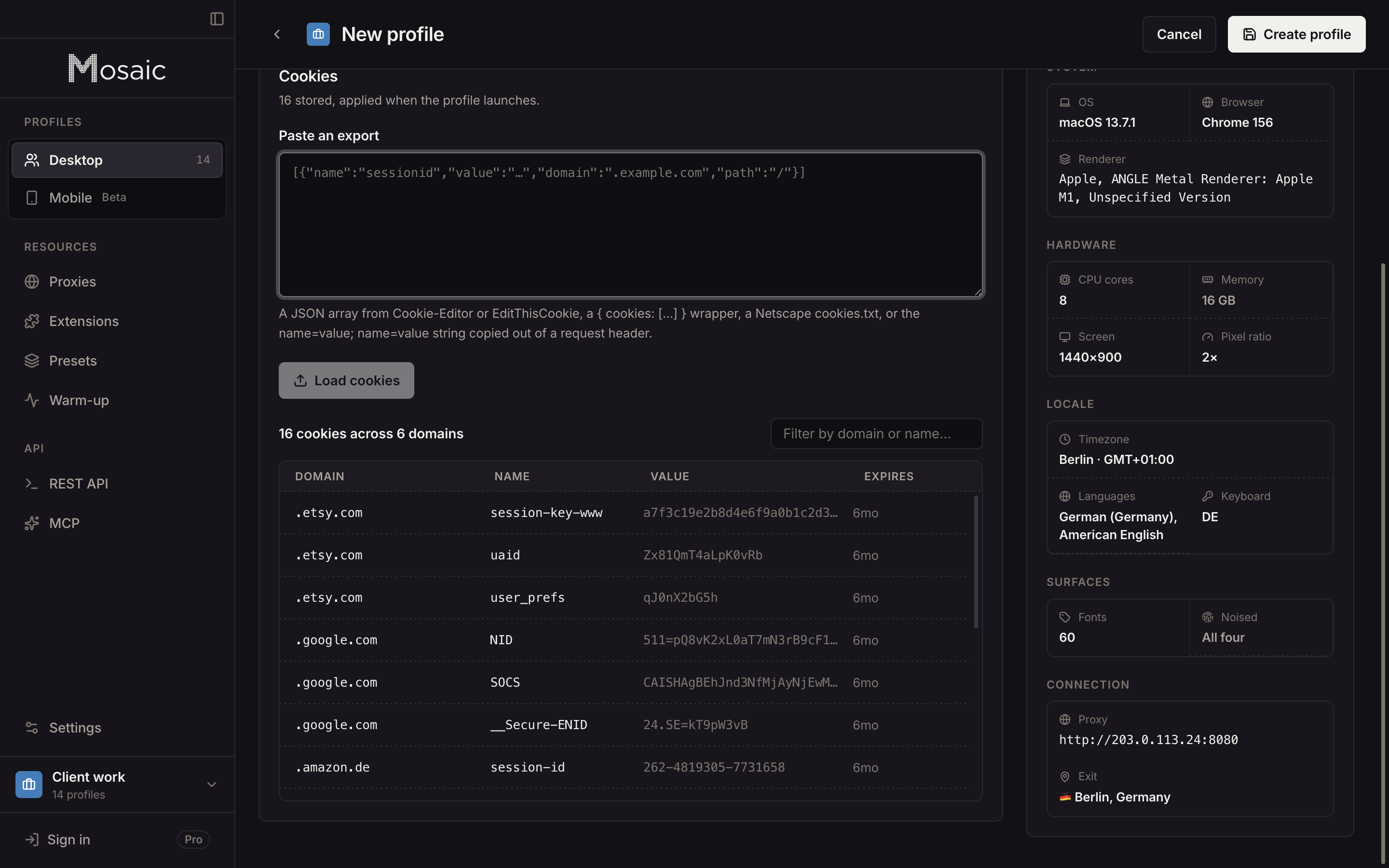
- For each profile, open its editor at Cookies, paste Dolphin's cookie export into Paste an export, press Load cookies and save.
A Dolphin profile that claims Windows, imported on a Mac, arrives in full and is named in the import summary, because a Mac backs a Windows claim less well than its own: fonts and how they are drawn come from the real machine. A consistency scanner can read that mismatch, which is what Pixelscan's "inconsistent fingerprint" verdict is about; on our Mac a Windows claim scored 80/100 on IPHey where macOS scored 100/100. Keeping the Windows claim is a valid choice. If you would rather a profile matched this computer, open it and set its Platform to macOS; the machine is drawn again for the Mac and its cookies stay.
An import counts against your plan like new profiles. Free is 3 profiles and 10 profile creations; the check covers the whole batch before any profile exists, so a file that would go past the limit is refused whole rather than half-imported. Pro is $49 a month whatever the count, on the pricing page.
Sources
- Dolphin Anty Help Center: Profile management in Dolphin {anty}, read November 2, 2026
- Dolphin Anty Help Center: How to create an API token, read November 2, 2026
- Dolphin{anty} API Reference (OpenAPI), read November 2, 2026